Happ অ্যাপে লিংকের মাধ্যমে VPN কীভাবে সেট আপ করবেন
এটি Happ অ্যাপের জন্য লিংক-ভিত্তিক সাবস্ক্রিপশন — Veepen VIP অ্যাপ নয়। আপনি এটি আমাদের Telegram বটের ভেতরে কেনেন, একটি সাবস্ক্রিপশন লিংক পান, এবং সেটি Happ-এ পেস্ট করেন। কোনো Veepen অ্যাকাউন্ট লাগে না এবং ট্রাফিক আনলিমিটেড। কেনা থেকে সংযোগ পর্যন্ত পুরো প্রক্রিয়াটি এখানে দেওয়া হলো।
1Veepen বট খুলুন
আমাদের Telegram বটের সঙ্গে একটি চ্যাট শুরু করুন এবং Start চাপুন। মূল মেনুতে দুটি আলাদা অপশন দেখা যায় — Veepen অ্যাপের জন্য একটি VIP সাবস্ক্রিপশন, এবং Happ-এর জন্য লিংকের মাধ্যমে VPN। দ্বিতীয়টি বেছে নিন।

2“লিংকের মাধ্যমে VPN” খুলুন
বটটি ব্যাখ্যা করে যে এটি Happ অ্যাপের জন্য একটি আলাদা সাবস্ক্রিপশন: কোনো অ্যাকাউন্ট নেই, আনলিমিটেড ট্রাফিক, এবং সবকিছু এখানে বটেই পরিচালিত হয়। শুরু করতে Buy VPN via link-এ ট্যাপ করুন।

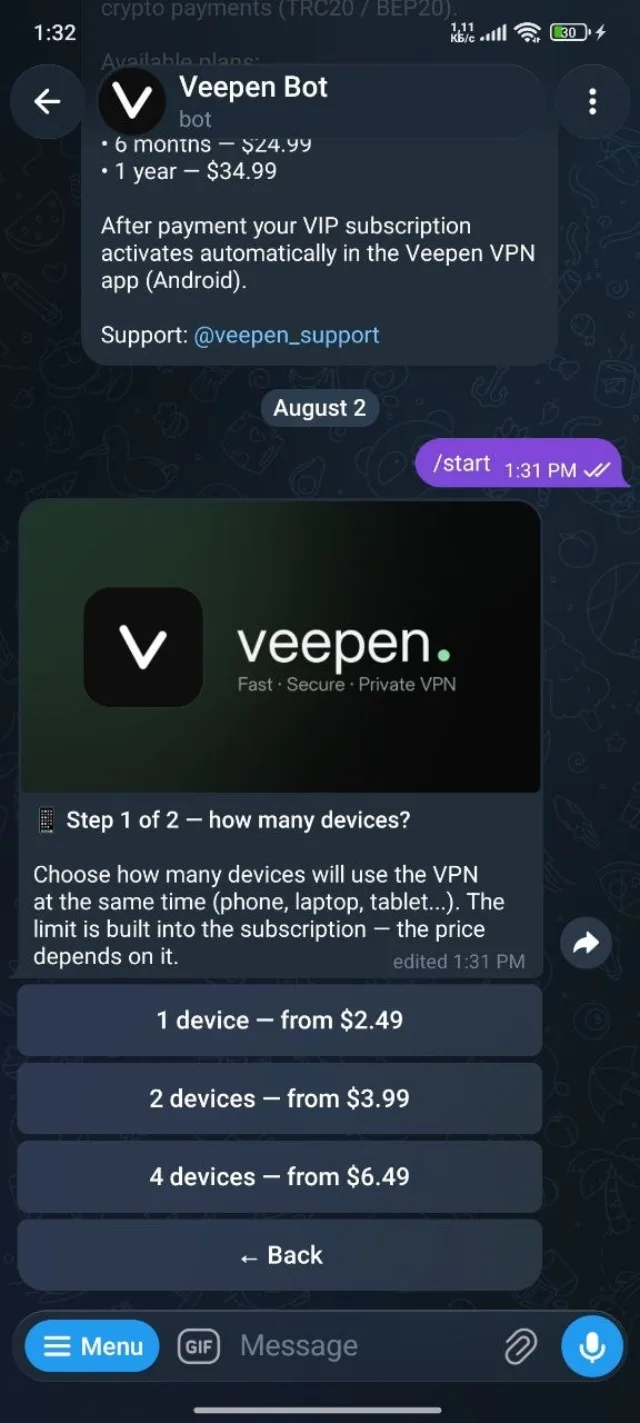
3কতগুলো ডিভাইস বেছে নিন
একসঙ্গে কতগুলো ডিভাইস VPN ব্যবহার করবে তা বেছে নিন — 1, 2, বা 4। সীমাটি সাবস্ক্রিপশনের মধ্যেই তৈরি এবং দাম সেই অনুযায়ী বাড়ে, একটি ডিভাইসের জন্য $2.49 থেকে শুরু।
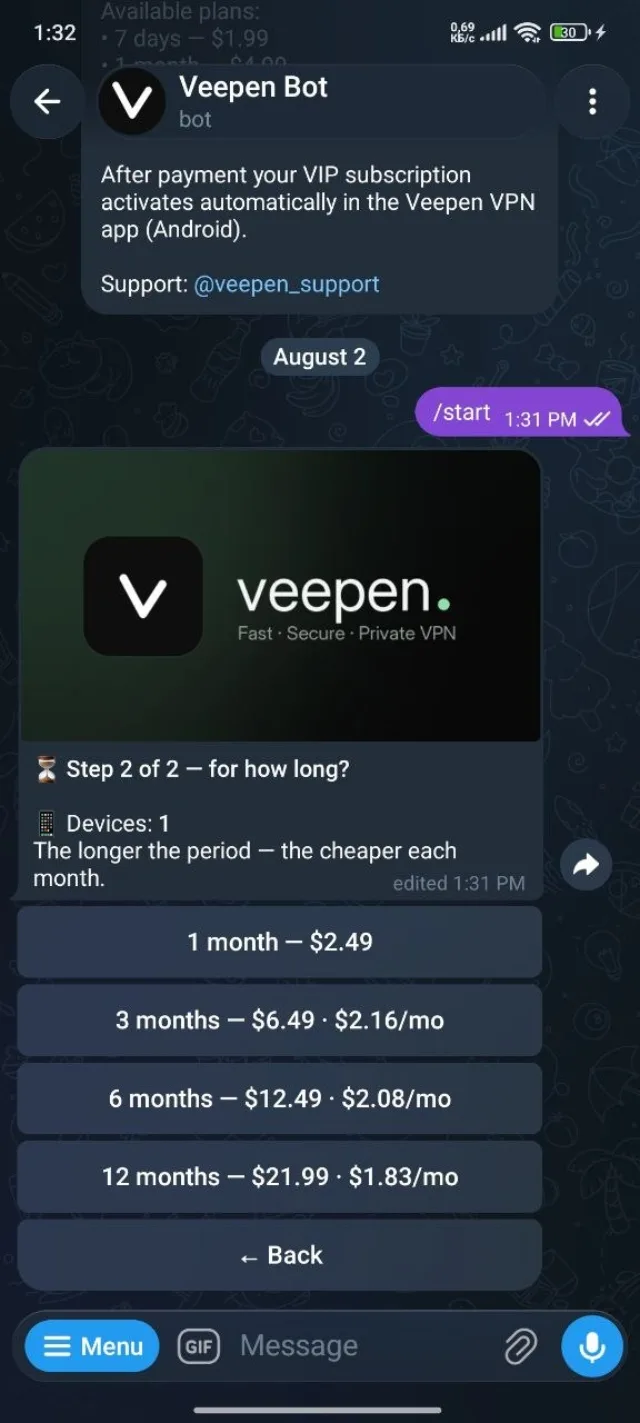
4মেয়াদ বেছে নিন
দীর্ঘ মেয়াদে প্রতি মাসে খরচ কম হয়। একটি ডিভাইসের জন্য অপশনগুলো 1 মাস থেকে 12 মাস পর্যন্ত, আর বার্ষিক প্ল্যানে প্রতি মাসে সবচেয়ে সস্তা পড়ে। আপনার জন্য উপযুক্ত মেয়াদটি বেছে নিন।
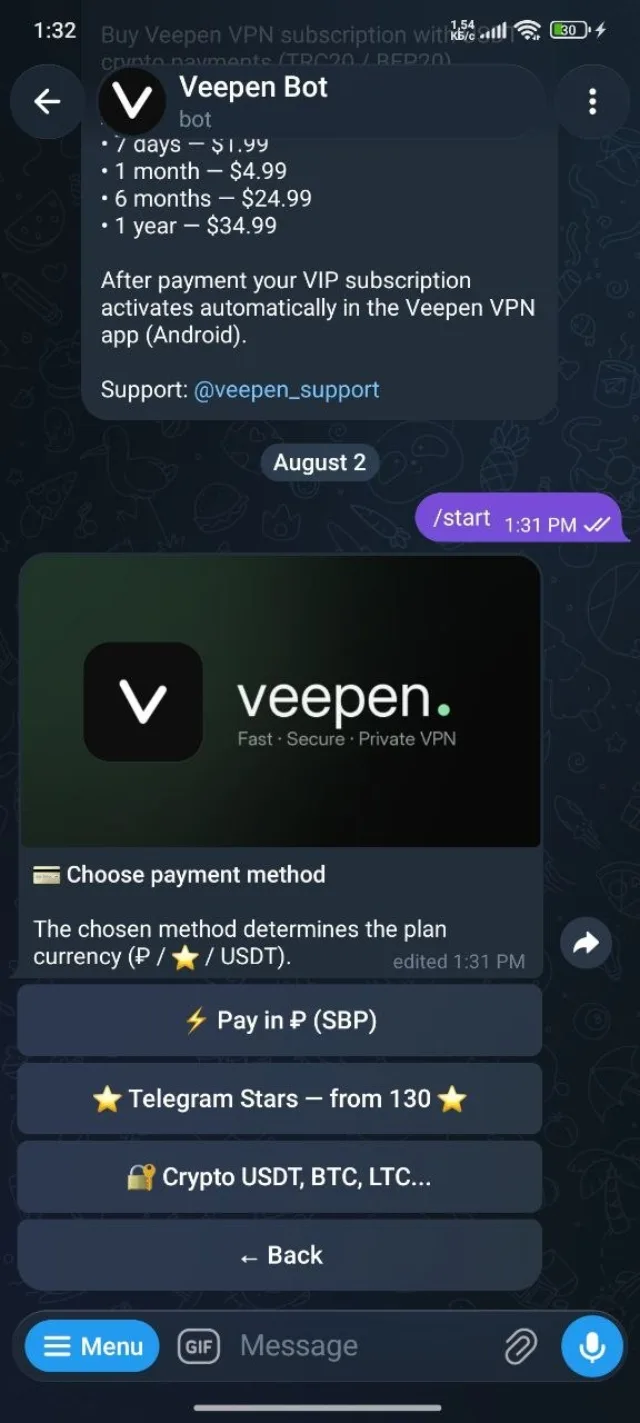
5একটি পেমেন্ট পদ্ধতি বেছে নিন
SBP-এর মাধ্যমে রুবলে, Telegram Stars দিয়ে, বা ক্রিপ্টোতে (USDT, BTC, LTC, এবং আরও) পরিশোধ করুন। আপনি যে পদ্ধতি বেছে নেন সেটিই প্ল্যানের মুদ্রা নির্ধারণ করে। সাবস্ক্রিপশন সক্রিয় করতে পেমেন্ট সম্পূর্ণ করুন।
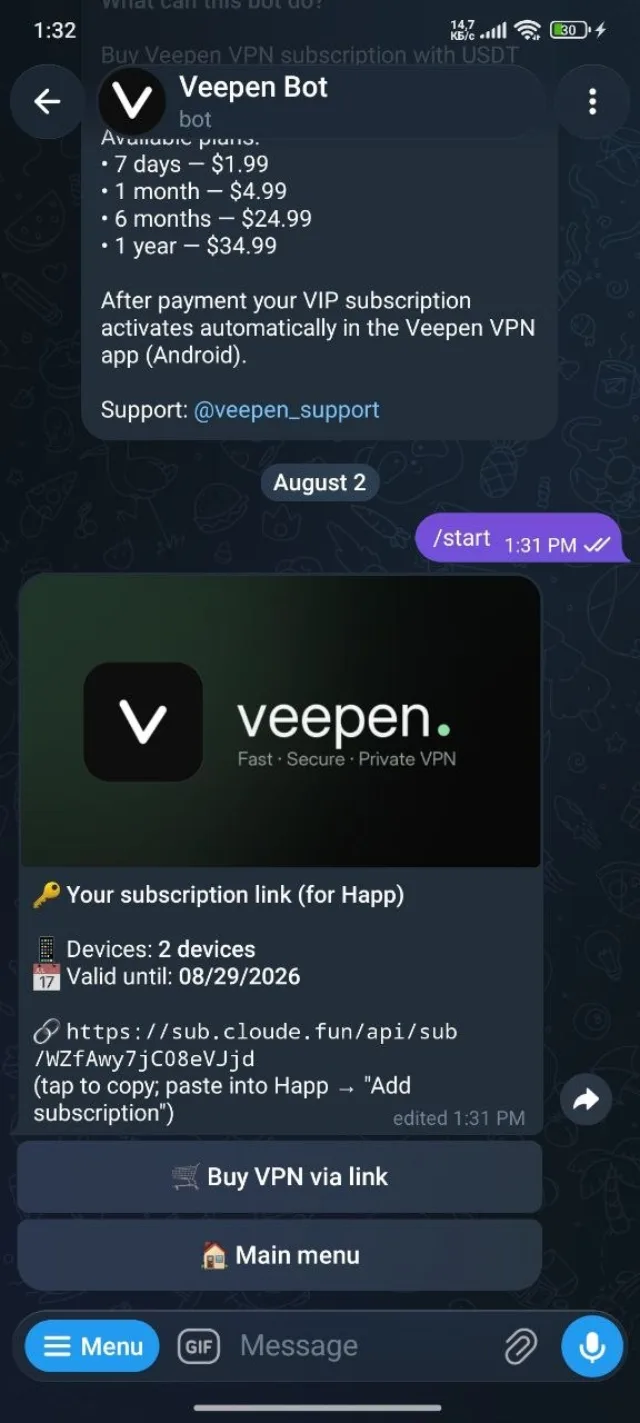
6আপনার সাবস্ক্রিপশন লিংক কপি করুন
পেমেন্টের পর বটটি আপনার ব্যক্তিগত সাবস্ক্রিপশন লিংক দেখায় (দেখতে https://sub.cloude.fun/api/sub/… এর মতো), সঙ্গে ডিভাইসের সংখ্যা এবং মেয়াদ শেষের তারিখ। কপি করতে সেটিতে ট্যাপ করুন।
7Happ-এ লিংকটি যোগ করুন
Happ অ্যাপ খুলুন এবং Add subscription-এ যান, তারপর কপি করা লিংকটি পেস্ট করুন এবং নিশ্চিত করুন। Happ সেখান থেকে আপনার সমস্ত সার্ভার লোড করে এবং সেগুলো আপডেট রাখে। একটি সার্ভার বেছে নিন, সংযোগ করতে ট্যাপ করুন, আর আপনি অনলাইন।
এটুকুই — আপনার Veepen সাবস্ক্রিপশন এখন Happ-এর ভেতরে আনলিমিটেড ট্রাফিক নিয়ে চলছে। অন্য কারও জন্য কিনছেন? দেখুন কীভাবে বন্ধুকে VPN উপহার দেবেন, অথবা আপনার রেফারেল লিংক শেয়ার করে ক্যাশব্যাক আয় করুন।